Table of Contents
Places table
The table of places is a hierarchical directory with free structure. In the uppermost level you can create countries, then you create districts or states or provinces (depending on administrative division of the country), then smaller divisions like cities etc, then you can even create a place with a street name and a house number.
In Places table you can do all actions described in Interface overview, you can create, edit or delete a place, view information about places. You can save or print the table and get statistics.
How to create a place
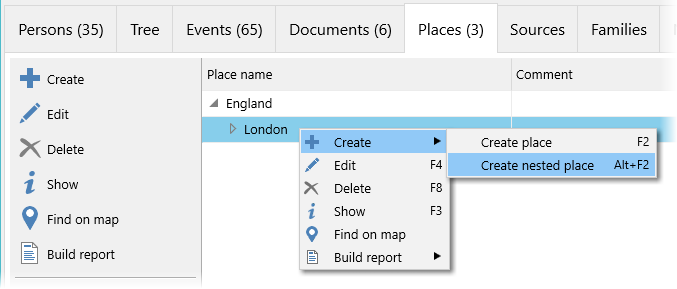
For a chosen place you can create either a place of the same level (Create a place menu option) or a place that is situated in the chosen place or belongs to it (Create a nested place menu option):
How to edit a place
Information tab of the place edit window contains all main information about the place:
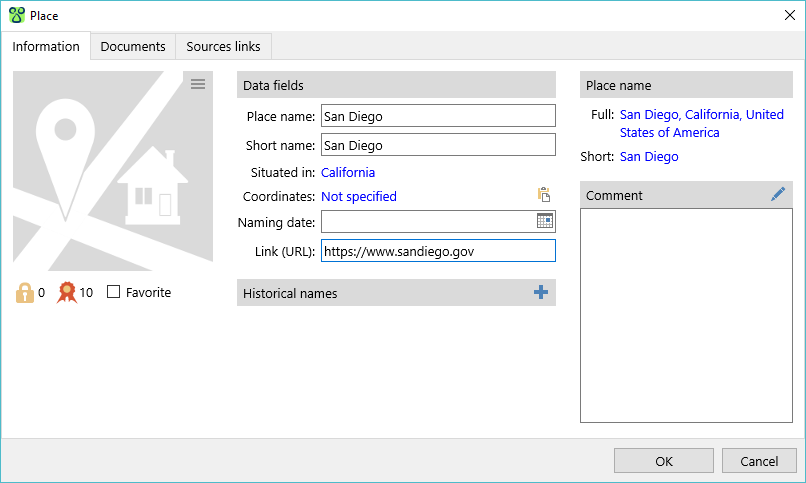
The information is divided into several groups:
- Photo. This is the main photo of the place. The button
 in the right upper corner of the photo opens the menu of actions connected to the photo.
 - Group under the photo. Levels of confidentiality and authenticity are set at your discretion. A document marked as Favourite is in bold letters in the Documents table. Navigation panel allows to jump to a favourite document.
- Data fields.
- Historical names. In different historical periods some places changed their names, or changed the administrative area they belonged to, or changed their territory or borders. If you create a new place for each name of the place, you can group these places in the list of historical names. The list of historical names is displayed in the place edit window, in the place information window place and in the brief information box (under the places table in the main program window).
- Place name. A place can have a
full nameand ashort name. The full name may contain a full postal address while the short name may contain just a town name or village name etc. It allows to store the full address in the database while showing just a town name to save some space in the tree. You can change these names by clicking them. - Comment
Documents tab contains a list of document connected to the place: photos, archive documents, etc.
Sources links tab contains a list of links to the sources that were used to get information about the place.