
Agelong Tree 5 Help
User Tools
General info
Data manipulation
Family tree
Reports
Files manipulations
Licensing
Extra
This is an old revision of the document!
Table of Contents
Persons table
In Persons table you can do all actions described in Interface overview, you can create, edit or delete a person, you can view information about a person, build a family tree and a lineage list.
Any data from the table can be saved in a file or printed; statistics for the table can be seen.
How to create a person
The menu Create allows to create a new person related to the active person:
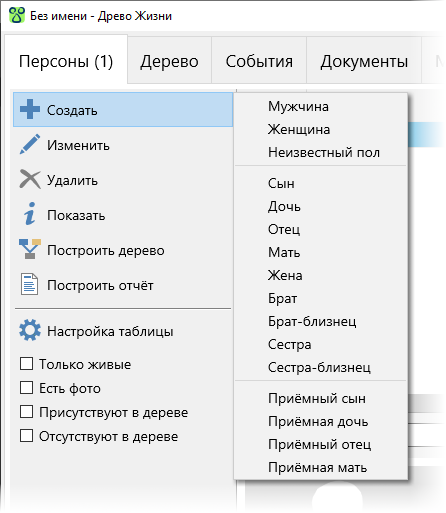
Father and Mother are active only if they haven't been created for the current (active) person yet. Brother and Sister are active only if the active person has a mother or a father (or both). A person of unknown sex cannot have a child, even an adopted one.
Attention! All actions in Create menu lead to the creation of a new person. If you need to connect the active person with another person that was created before, you need to create or edit a corresponding event (a marriage, for example) or to specify a mother or a father in person's edit window.
How to edit a person
On the Information tab of the person's edit window there is some main information about a person:
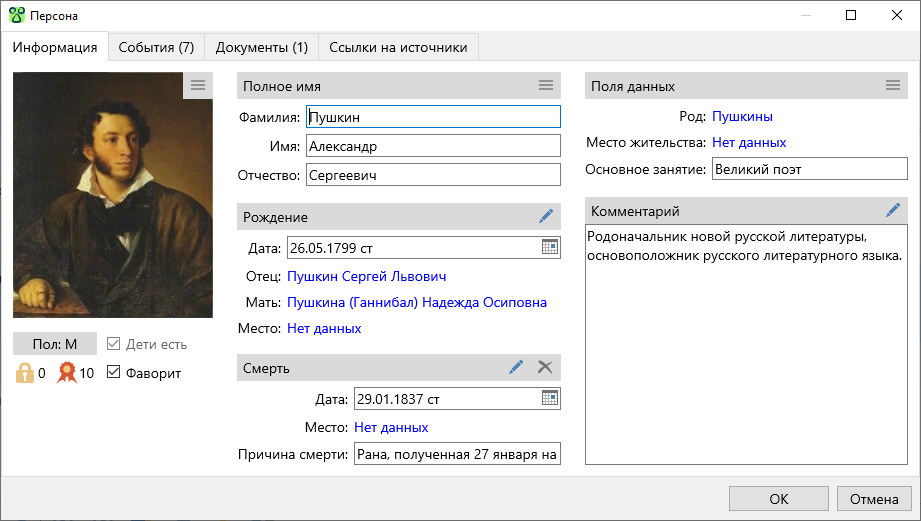
All information is divided into several groups:
- A photograph. This is the person's main photo. The button
 in the right upper corner of the photo opens the menu of actions connected to the photo. It is possible to choose a photo from a file, in this case a new document is createdand then set as the person's main photo. It is possible to choose an existing document (a photo) connected to the person (from the list).
 No photoclears the main photo window, this action does not delete the document that was used before clearing. - Data group under the photo.
Sexcan be changed only if it does not contradict the events where this person participates. For example, if a woman participates inBirthevent as a mother, her sex cannot be changed. If the person does not have any children created,No childrenoption is active, it is possible to set its value. If at least one child is created, the option is changed tohas childrenand becomes in active. Levels
Если у персоны нет детей, то опция Нет детей активна, её значение можно установить. Если хотя бы один ребёнок введён, то опция меняет название на Дети есть и становится неактивной. Значения Уровень конфиденциальности и Уровень достоверности устанавливаются на усмотрение пользователя, они могут использоваться в фильтрах и при сохранении данных в отдельный файл. Персона отмеченная как Фаворит выделяется жирным шрифтом в таблице персон и в дереве, возможен быстрый переход на фаворита в панели навигации.
- Полное имя персоны.
- Основные сведения о рождении персоны. Кнопка
 открывает окно редактирования события, содержащее полную информацию об этом событии.
 - Основные сведения о смерти персоны или включённая опция
В живых, если этот человек жив. - Поля данных. Настраивать существующие и создавать свои поля данных можно в окне настройки полей. Если в настройке поля опция
Всегда отображать при редактированиивыключена, то поле с пустым значением не отображается, включить отображение такого поля можно с помощью меню кнопки - Комментарий.
На вкладке События находится список событий, в которых данная персона участвует. Можно создавать, редактировать и удалять события; менять порядок событий можно только в том случае, если это изменение не противоречит датам событий.
Вкладка Документы содержит список документов, связанных с данной персоной.
Список ссылок на источники, из которых была получена информация о персоне, находится на вкладке Ссылки на источники.