
Agelong Tree 5 Help
User Tools
General info
Data manipulation
Family tree
Reports
Files manipulations
Licensing
Extra
This is an old revision of the document!
Table of Contents
Places table
The table of places is a hierarchical directory with free structure. In the uppermost level you can create countries, then you create districts or states or provinces (depending on administrative division of the country), then smaller divisions like cities etc, then you can even create a place with a street name and a house number.
In Places table you can do all actions described in Interface overview, you can create, edit or delete a place, view information about places. You can save or print the table and get statistics.
How to create a place
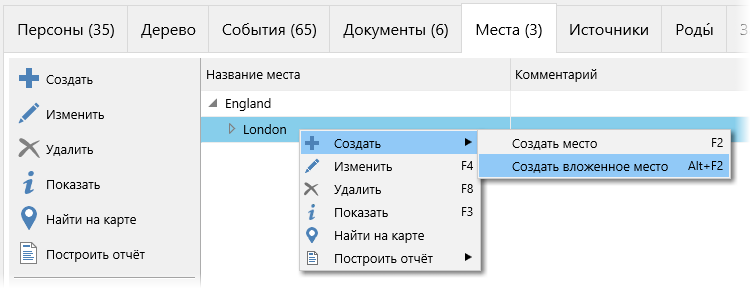
For a chosen place you can create either a place of the same level (Create a place menu option) or a place that is situated in the chosen place or belongs to it (Create a nested place menu option):
How to edit a place
Information tab of the place edit window contains all main information about the place:
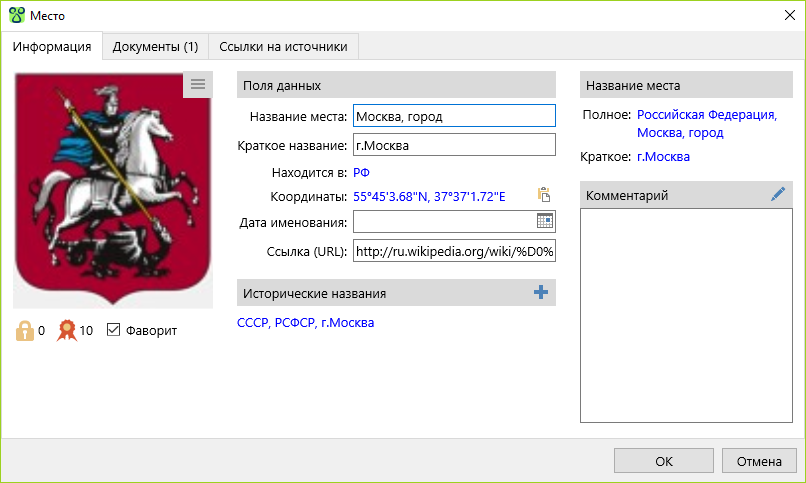
The information is divided into several groups:
- Photo. This is the main photo of the place. The button
 in the right upper corner of the photo opens the menu of actions connected to the photo.
 - Group under the photo. Levels of confidentiality and authenticity are set at your discretion. A document marked as Favourite is in bold letters in the Documents table. Navigation panel allows to jump to a favourite document.
- Data fields .
- Historical names. In different historical periods some places changed their names, or changed the administrative area that they belonged to, or changed their territory or borders. If you create a new place for each name of the place, you can group these places in the list of historical names.
fактически это разные места, полностью или частично совпадающие географически, но существовавшие в разное время. Такие места можно сгруппировать с помощью списка исторических названий, который кроме окна редактирования места отображается в окне информации о месте и в панели краткой информации о месте (под таблицей мест в главном окне программы).
- Place name. Место имеет полное и краткое название. Полное название места может содержать полный почтовый адрес, краткое название – лишь краткое указание места, обычно это название населенного пункта. Это даёт возможность одновременно хранить полный адрес и отображать только его краткую часть, для экономии места. Настроить состав полного или краткого названия места можно щёлкнув по соответствущему названию места в данной группе.
- Comment
Вкладка Документы содержит список документов, связанных с данным местом.
Список ссылок на источники, из которых была получена информация о месте, находится на вкладке Ссылки на источники.